Estimated Reading Time: 8 minutes
As digital products grow, maintaining a consistent user experience becomes increasingly challenging. New features, expanding teams, and multiple platforms can quickly lead to inconsistent interfaces, duplicated components, and slower development cycles.
Design systems solve this challenge by creating a shared language between designers and developers. Rather than designing every screen from scratch, teams build reusable components, establish design standards, and create scalable foundations that ensure consistency across every product.
In this article, we’ll explore what design systems are, why they matter, and how organizations can use them to build enterprise applications that remain consistent as they scale.
What Is a Design System?
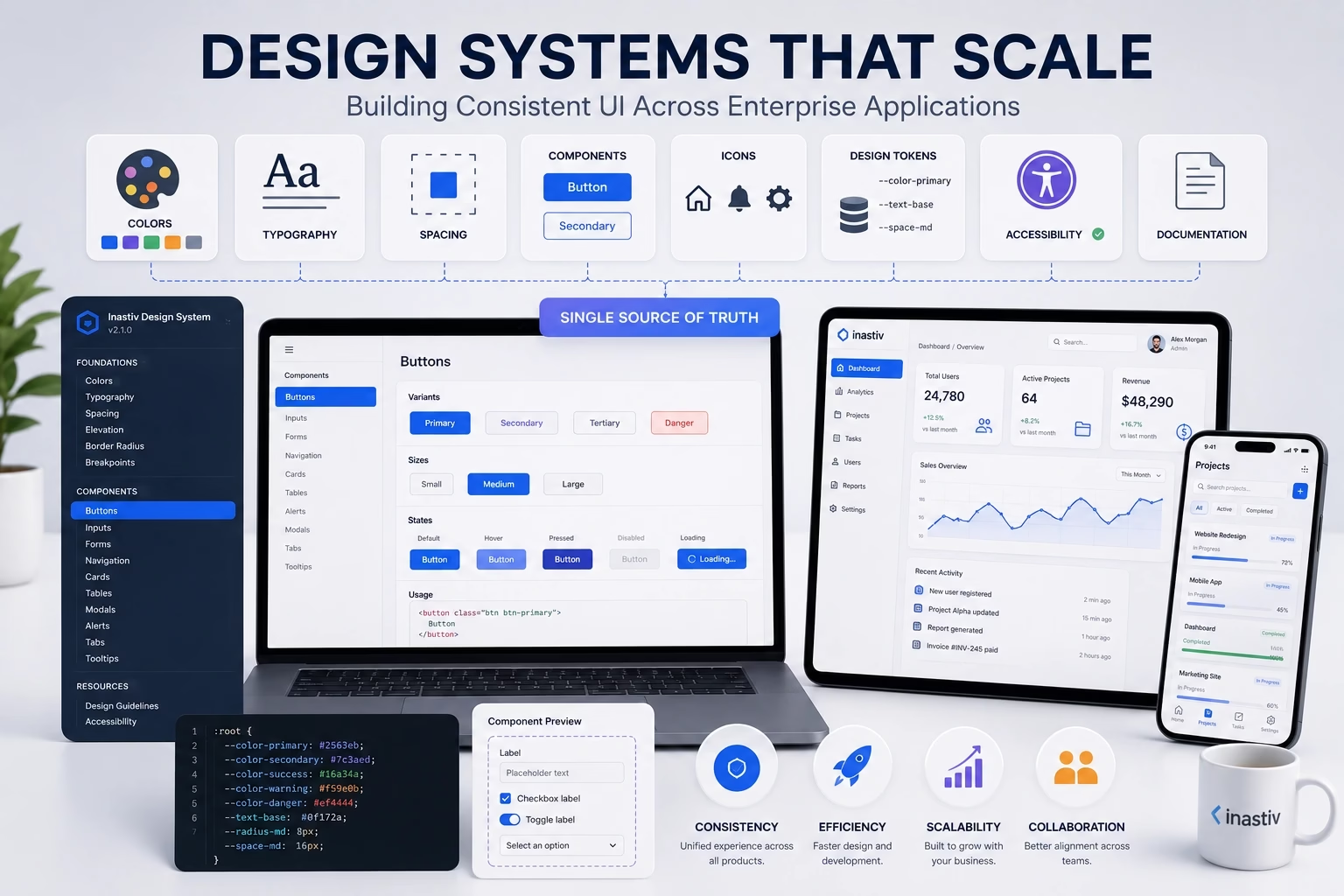
A design system is a centralized collection of reusable components, visual guidelines, design principles, and development standards that help teams build consistent digital products.
Instead of viewing a design system as a UI kit, think of it as the operating manual for your product’s interface. It defines not only how components look, but also how they behave and when they should be used.
A comprehensive design system typically includes:
- Color palette
- Typography styles
- Spacing rules
- Grid systems
- Buttons
- Forms
- Navigation components
- Cards
- Icons
- Design tokens
- Accessibility guidelines
- Developer documentation
By standardizing these elements, teams can create interfaces that feel familiar regardless of where users are within the product.
Why Enterprise Applications Need Design Systems
Enterprise platforms often contain hundreds of screens, dozens of user roles, and years of ongoing development. Without a structured design system, inconsistencies naturally emerge.
Different teams may unknowingly create multiple versions of the same component, resulting in fragmented user experiences and increased maintenance costs.
A design system provides a single source of truth that aligns product managers, designers, developers, and quality assurance teams around the same standards.
The Benefits of a Scalable Design System
Organizations that invest in design systems often experience measurable improvements across both design and development workflows.
- Consistent user experiences across all products.
- Faster UI design and prototyping.
- Reduced development time through reusable components.
- Simplified onboarding for new team members.
- Lower maintenance costs.
- Improved collaboration between designers and developers.
- Greater scalability as products evolve.
Rather than solving the same problems repeatedly, teams can focus on building new features and delivering greater value to users.
Core Building Blocks of Every Design System
A scalable design system starts with strong foundations. Every reusable component depends on a consistent set of design decisions.
These foundational elements include:
- Color variables
- Typography scale
- Spacing system
- Elevation and shadows
- Border radius
- Icon library
- Responsive breakpoints
Many organizations implement these values as design tokens, allowing them to remain synchronized across design tools and development environments.
Create Components Instead of Pages
One of the biggest mindset shifts when adopting a design system is moving away from designing individual pages toward building reusable components.
Instead of creating ten different buttons for ten different pages, designers create one flexible button component that supports multiple sizes, colors, and states.
Examples of reusable components include:
- Primary and secondary buttons
- Input fields
- Dropdown menus
- Navigation bars
- Cards
- Tables
- Alerts
- Modals
- Tabs
- Accordions
Reusable components improve consistency while dramatically reducing duplicated work.
Design and Development Should Share the Same Language
A successful design system extends beyond Figma or other design tools. Developers should implement the same components as reusable frontend libraries.
When designers update a component and developers maintain the matching code component, both disciplines remain aligned throughout the product lifecycle.
This shared approach minimizes design drift and reduces implementation inconsistencies.
The best design systems don’t just improve interfaces. They improve collaboration.
Accessibility Must Be Built In
Accessibility should never be treated as an optional enhancement. Every reusable component should be designed and tested to meet accessibility standards from the beginning.
This includes:
- Sufficient color contrast.
- Keyboard navigation.
- Visible focus states.
- Proper semantic HTML.
- ARIA attributes where appropriate.
- Screen reader compatibility.
When accessibility is embedded into reusable components, every future interface automatically benefits from those improvements.
Document Everything
Even the best component library loses value without proper documentation.
Documentation should explain:
- When to use each component.
- When not to use it.
- Available variations.
- Interaction behavior.
- Accessibility requirements.
- Code examples.
Clear documentation enables teams to work independently while maintaining consistency.
Measuring the Success of Your Design System
A mature design system delivers value beyond visual consistency. Organizations can measure its effectiveness using metrics such as:
- Reduction in duplicated components.
- Faster feature delivery.
- Improved design consistency.
- Lower UI-related bugs.
- Higher developer productivity.
- Improved user satisfaction.
Regular reviews help identify opportunities to expand and refine the system as business needs evolve.
Common Challenges When Building a Design System
Implementing a design system requires both technical planning and organizational commitment.
Some common challenges include:
- Inconsistent adoption across teams.
- Outdated documentation.
- Too many unnecessary component variations.
- Lack of governance.
- Poor communication between designers and developers.
Successful organizations treat their design system as a living product that evolves alongside the applications it supports.
Final Thoughts
Design systems are no longer reserved for the world’s largest technology companies. As products become more sophisticated and teams grow, having a scalable design system becomes essential for maintaining quality, efficiency, and consistency.
By creating reusable components, establishing shared standards, and encouraging collaboration between design and development teams, organizations can deliver better digital experiences while accelerating product development.
A strong design system is more than a collection of UI elements. It’s a strategic investment that enables products to grow without sacrificing consistency or user experience.
About Inastiv
At Inastiv, we help businesses create scalable digital products by combining thoughtful UI/UX design with modern software engineering. From establishing enterprise-grade design systems to developing custom web and mobile applications, we build solutions that remain consistent, maintainable, and ready to grow alongside your business.